My outings
Lodestar remembers your walks automatically, so you can always find your way back. Open My outings from the Lodestar menu. It has three tabs: Outings, Saved journeys (Journeys) and Portals (Portals).
Retrace my steps
Section titled “Retrace my steps”Press Retrace my steps on the Lodestar menu. Lodestar guides you back along your latest outing, the way you came, through every corner you turned. The menu’s status line says “Retracing your steps” until you reach the start, when Lodestar says “You reached the beginning of these recorded steps.” Press Stop guiding to end a retrace early.
If there is nothing to retrace yet, Retrace my steps opens My outings instead, with a message saying why.
The retrace follows the height you travelled at, including flights. The world may have changed since you walked there, so a recorded path is a reminder of the way you came, not a promise that it is still open.
Outings
Section titled “Outings”Each outing is one stretch of walking. Its row shows a small sketch of the path, when it started (“Today” or the date, and the time), where it started (“Walk from Home” or the dimension), and how far you went, such as “38 blocks travelled”.
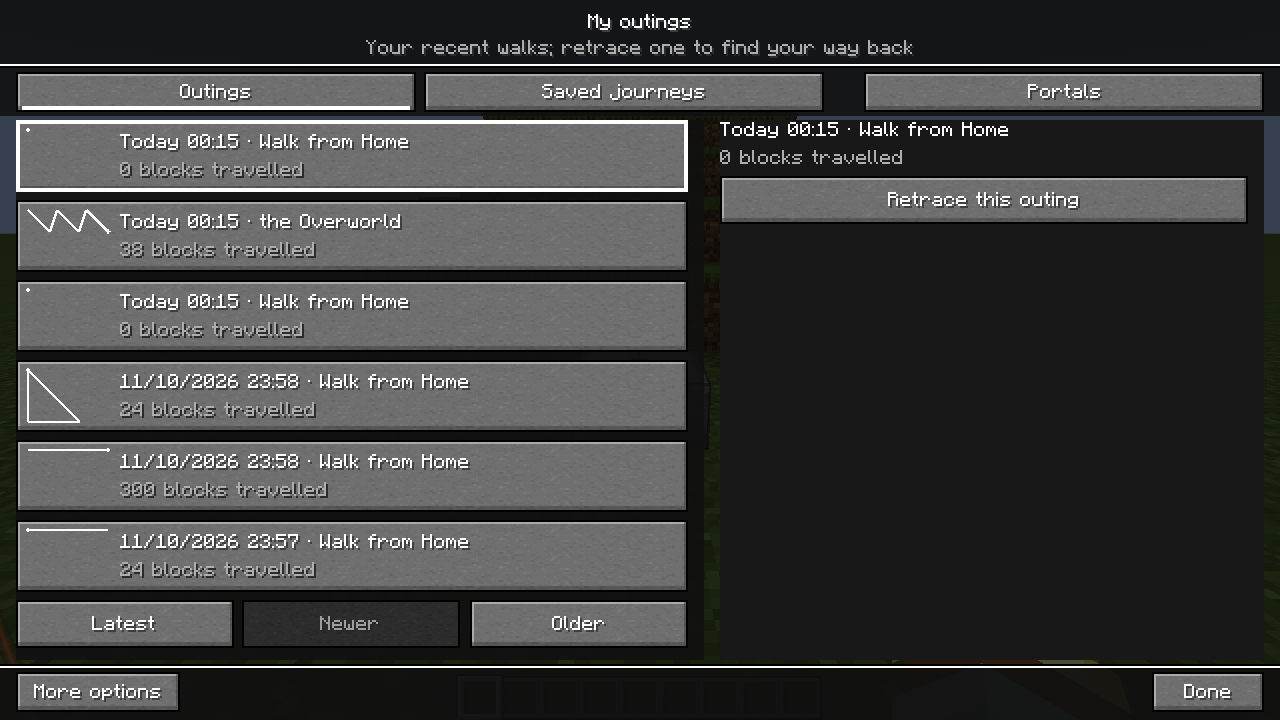
Selecting a row never starts guiding by itself. Select an outing and press Retrace this outing to be guided back along it, starting from where it ended.
Latest shows your most recent outings, Older shows earlier ones and Newer goes back toward the latest. While older outings load, the list says “Preparing older outings…”.
A new outing begins when you join a world, change dimension, die, pause recording, or jump more than 32 blocks at once (for example by teleporting). Lodestar never draws a made-up line across those gaps.
What is recorded
Section titled “What is recorded”- Your position while you move. Standing still adds nothing.
- Everything is kept: there is no time limit and nothing is deleted. Lodestar stores your history in small pieces and only reads the ones it needs, so a long history does not slow the menu down.
- History is kept per world (or server) and per player, on your own computer. Nobody else can see it.
- Lodestar saves your walk every few seconds and when you leave the world. If the game crashes, the last few seconds of walking may be missing.
Pause recording
Section titled “Pause recording”Turn on More options in My outings and press Pause recording. Lodestar stops remembering your walks until you press Resume recording. Pausing keeps everything recorded so far. While recording is paused, the Outings tab says “Recording is paused; new walks are not remembered.”
You can also set this in Lodestar’s settings as Remember my steps (Settings).
If the history file cannot be read, the Outings tab says “Your history could not be read. The file was kept as it was.” Lodestar does not record over it. See Saved data and backups.